Before you play 7 min read
Which chess clock is on my table?
Start, press, pause — and understand the flag
A different clock should not make your next game frightening. Find the one that looks like yours, learn the pause button, and practise once before the round. This guide assumes the organiser has already set the time.
Find your clock
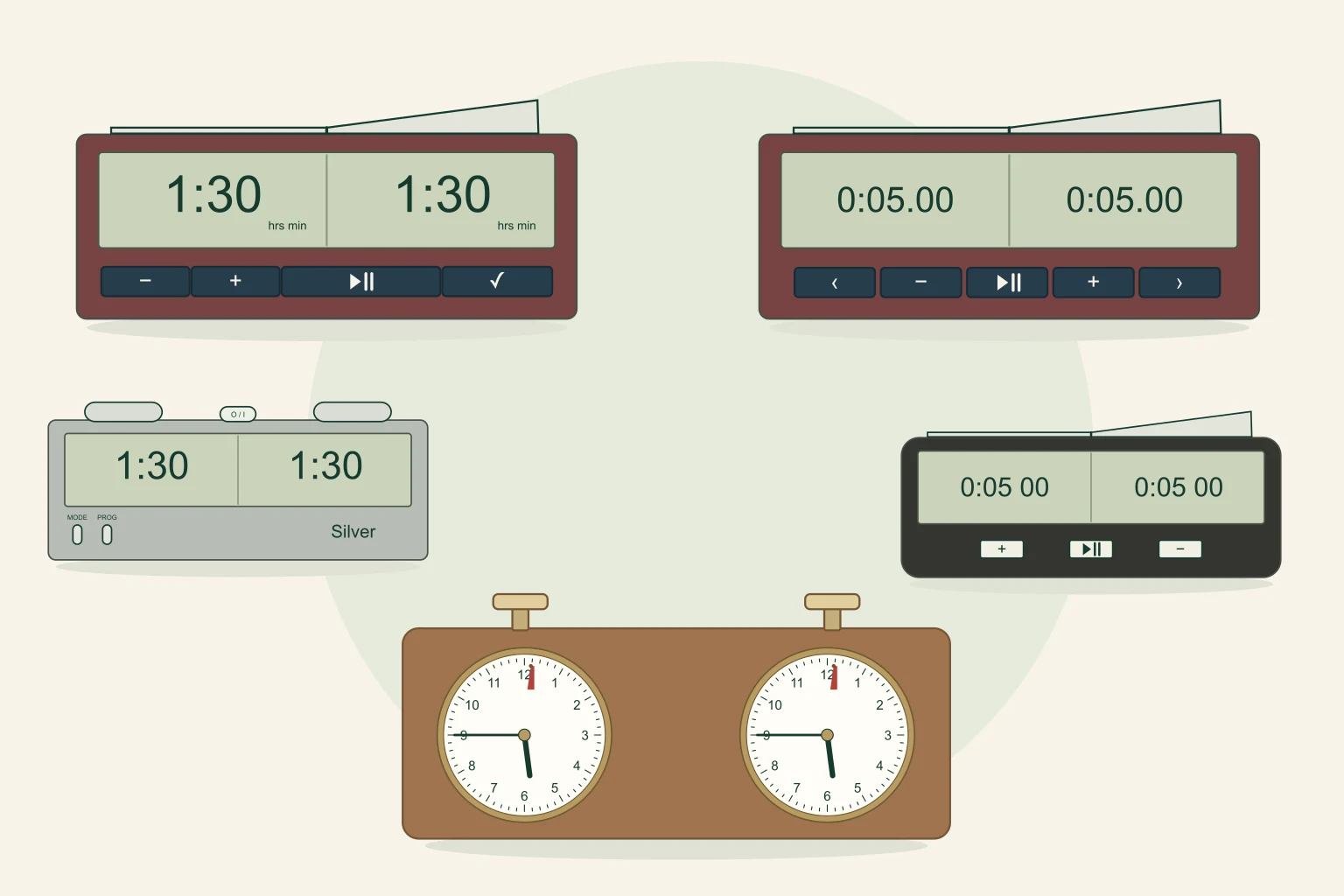
Use the drawings to find the right section, then check the model label. Colour alone is not enough: similar cases can have different controls. The numbered markers show where to look, not buttons on this page.
Before the round: ask three small questions
When the arbiter gives the start signal, White’s clock runs first. After a move, press your own player button or end of the rocker: your time stops and your opponent’s starts. Use the hand that moved the piece.
- Which display is mine, and whose time starts first?
- Which control stops BOTH clocks?
- What will the display or flag show when my time runs out?
Sources & further reading: [1]
DGT2010: the small front start/pause button
Look for the DGT2010 model name, a long rocker on top and a row of small buttons below the display.

Try this clock
You control both players. Tap the clock’s buttons, just as you would at the table.
- Start
- Switch player
- Pause
- Resume
Practice only: one minute each, no increment, final time period. This demo stops at zero; real clocks can behave differently depending on their settings.
- Start
- With the clock ready and White’s end of the rocker raised, briefly press ▶‖.
- After your move
- Press your end of the top rocker (1).
- Pause
- Briefly press the front ▶‖ button (2). Both times stop.
- Resume
- Briefly press ▶‖ again when the arbiter allows play. Leave the rocker in place while paused.
- Read the time
- At 20 minutes or more: hours:minutes. Below 20 minutes: minutes.seconds. Read the small hrs/min/sec labels: 1:30 means 90 minutes, while 1.30 means 90 seconds.
Sources & further reading: [2]
DGT3000: a central pause button and visible seconds
This model has a broad silver rocker, a large display and five front buttons. Confirm DGT3000 on the case.

Try this clock
You control both players. Tap the clock’s buttons, just as you would at the table.
- Start
- Switch player
- Pause
- Resume
Practice only: one minute each, no increment, final time period. This demo stops at zero; real clocks can behave differently depending on their settings.
- Start
- With White’s end raised and the clock ready, briefly press the middle ▶‖ button.
- After your move
- Press your end of the rocker (1).
- Pause
- Briefly press the middle front ▶‖ button (2).
- Resume
- Briefly press ▶‖ again on the arbiter’s instruction. Do not flip the rocker during the pause.
- Read the time
- Seconds remain visible from the start. Read hours, minutes and seconds separately: 1:30.00 is an hour and a half; 0:01.30 is a minute and a half.
Sources & further reading: [3]
Silver: pause on top, resume with a player button
The classic Silver has three top buttons: two large player buttons and a smaller middle O / I / Stop button. MODE and PROG are lower on the front. These instructions follow the linked classic manual; check your version.

Try this clock
You control both players. Tap the clock’s buttons, just as you would at the table.
- Start
- Switch player
- Pause
- Resume
Practice only: one minute each, no increment, final time period. This demo stops at zero; real clocks can behave differently depending on their settings.
- Start
- Once the clock is ready, Black presses Black’s outer player button to start White’s time.
- After your move
- Press your outer player button (1).
- Pause
- Press the small middle top O / I / Stop button (2) once.
- Resume
- On this version, press either outer player button when told to resume. The clock remembers whose turn it was. The middle button is not the resume control.
- Read the time
- The classic manual uses hours:minutes above ten minutes and minutes.seconds below ten. At 1:30 you have 90 minutes; at 1.30 you have 90 seconds.
Sources & further reading: [4]
LEAP PQ9907S: the middle front button
Look for LEAP, a top rocker and three front buttons: +, a start/pause symbol and −. These instructions are for PQ9907S; similar LEAP versions may work differently. Check the model label underneath before the round.

Try this clock
You control both players. Tap the clock’s buttons, just as you would at the table.
- Start
- Switch player
- Pause
- Resume
Practice only: one minute each, no increment, final time period. This demo stops at zero; real clocks can behave differently depending on their settings.
- Start
- With the time already set and White’s rocker end raised, briefly press the middle front start/pause button.
- After your move
- Press your end of the rocker (1).
- Pause
- Briefly press the middle front button (2).
- Resume
- Briefly press the same button again when play may resume.
- Read the time
- Read the separated hour, minute and second groups. 0:05 00 is five minutes; 0:00 30 is thirty seconds. In countdown mode, the remaining time falls towards zero.
Sources & further reading: [5]
Mechanical clocks: two buttons, two faces
A wooden case does not identify a particular manufacturer. Many traditional clocks, including the GARDE mechanism in the linked manual, stop with both top buttons level in their middle position. Ask for a demonstration on your actual clock.

Try this clock
You control both players. Tap the clock’s buttons, just as you would at the table.
- Start
- Switch player
- Pause
- Resume
Explore the hands and flag
This example ends at 6:00. Move White’s hands, or watch the final ten seconds. Black’s clock stays still.
On the real clock, gently bring the two top buttons to equal height. This practice action shows that position; it is not a third button on the clock.
Practice only: the time limit is 6:00. The flag movement is simplified; the hands keep moving after it falls. Ask the arbiter to show you your actual clock.
- Start
- Once told to start, Black presses Black’s top button, setting White’s clock running.
- After your move
- Press your own top button. Do not force or hit it.
- Pause
- On this mechanism, gently bring the two top buttons to equal height in the middle position. Check that both clock mechanisms have stopped. If yours works differently, call the arbiter.
- Resume
- On the arbiter’s instruction, press the button of the player who is NOT to move. That starts the clock of the player whose turn it is.
- Read the time
- The hands move clockwise like an ordinary clock, but show a tournament reference time, not the time of day. Read the long minute hand AND the short hour hand against the agreed time limit.
Sources & further reading: [6]
The red flag: raised is not fallen
The long minute hand lifts the little red flag as it approaches 12. The flag then drops as the hand passes the top. A lifted flag means the time limit is near, not that it has already been reached.
Example: the arbiter has confirmed a time limit of 6:00 on this dial. Each large number is five minutes along the minute scale. Read how far the hands still have to travel to that limit.


A one-minute rehearsal before the tournament
Use a spare clock with a parent or coach, away from an active game. Ask the organiser to leave the tournament clock ready afterwards.
- Point to your time and your player button.
- Start, make a pretend move, and press your side.
- Pause both clocks. Show that neither side is running.
- Resume correctly — remember the Silver uses a player button.
- Say what one minute left looks like, and what shows that the time has expired.
Sources & further reading
Clock manuals and FIDE clock rules checked on 14 November 2026. The Silver instructions refer to the linked April 2008 manual. Model revisions can differ; ask the arbiter to demonstrate the clock on your table before play.
- FIDE Laws of Chess: Articles 3–9 and 11; Appendices A–C
- DGT2010: manufacturer manual, operation 5–6 and 11–12 (manual archive)
- DGT3000: manufacturer manual V2.0, June 2025 (multilingual PDF)
- EuroChessInternational: Silver manual, April 2008, sections 3, 5–6 (PDF)
- LEAP: PQ9907S manufacturer manual and control diagram (PDF)
- GARDE: original mechanical accessible-clock instructions, neutral stop and start (German PDF, Löberitz Chess Museum)